JAVA Remove Console escape Ansi log char
String tmp.replaceAll("\u001B\\[[;\\d]*m", "");
JAVA Remove Console escape Ansi log char
String tmp.replaceAll("\u001B\\[[;\\d]*m", "");
Eclipse 佈景主題還原
rename folder
D:\workspace-spring-tool-suite-4-4.12.1.RELEASE\.metadata\.plugins\org.eclipse.core.runtime\.settings
D:\workspace-spring-tool-suite-4-4.12.1.RELEASE\.metadata\.plugins\org.eclipse.core.runtime\_.settings
ANSI console in Eclipse
看到 standalong 的 springboot 有彩色的console
再看看 eclipse 沒有,覺的難過
Eclipse >> Eclipse Marketplace >> 搜尋安裝 ANSI Escape in Console
Eclipse >> Window >> Preferences >> Ansi Console >>Enable打勾
Eclipse >> Window >> Preferences >> Run/Debug >>Console>>Enable word wrap 取消打勾
Spring boot 專案 >> src\main\resources\application.properties >>
新增
#控制台彩色输出
spring.output.ansi.enabled=ALWAYS
參考
https://www.youtube.com/watch?v=xLrK9PctVAk
https://marketplace.eclipse.org/content/ansi-escape-console?mpc=true&mpc_state=
https://blog.csdn.net/shichen2010/article/details/83031418
維護古蹟,Eclipse Web.xml 老是報錯
加入下面這兩行
就沒有紅字了
http://www.springmodules.org/schema/cache/springmodules-cache.xsd
http://www.springmodules.org/schema/cache/springmodules-ehcache.xsd
<?xml version="1.0" encoding="UTF-8"?>
<web-app version="2.4"
    xmlns="http://java.sun.com/xml/ns/j2ee"
    xmlns:xsi="http://www.w3.org/2001/XMLSchema-instance"
    xsi:schemaLocation="http://java.sun.com/xml/ns/j2ee
    http://java.sun.com/xml/ns/j2ee/web-app_2_4.xsd">
<?xml version="1.0" encoding="UTF-8"?>
<web-app version="2.4"
xmlns="http://java.sun.com/xml/ns/j2ee"
xmlns:xsi="http://www.w3.org/2001/XMLSchema-instance
http://www.springmodules.org/schema/cache/springmodules-cache.xsd
http://www.springmodules.org/schema/cache/springmodules-ehcache.xsd"
xsi:schemaLocation="http://java.sun.com/xml/ns/j2ee
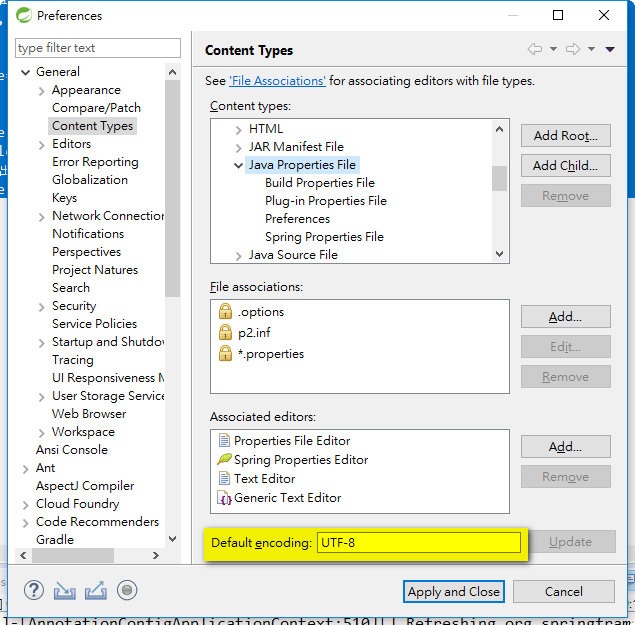
http://java.sun.com/xml/ns/j2ee/web-app_2_4.xsd"> Eclipse 依據副檔名單獨設定檔案編碼
General
>> Content Types
Text
>> Add Child
>> SQL File
File associations
>> *.sql
Associated Editor
>> Text Editor
Default Encoding
>> MS950
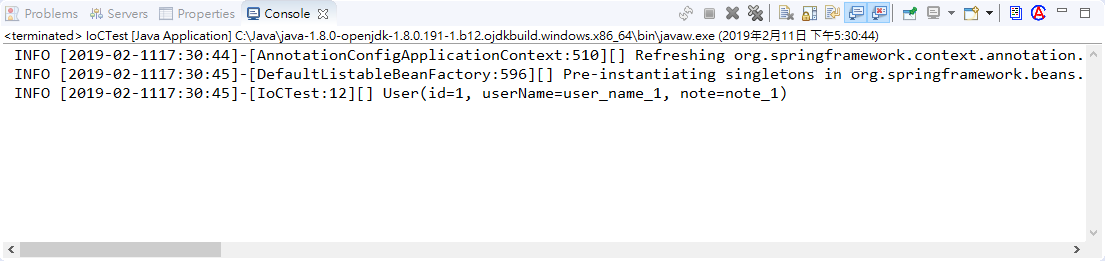
PropertiesEditorPropertiesEditor_Asian_NLS 是否安裝外掛多國語言 (非必要)Properties EditorPropertiesEditor 開啟 properties 檔案即可看見中文了Window > Preferences > Run/Debug > Console, there's a checkbox "Limit console output" and a text field for entering the buffer size of the console.


 4.0.0
 org.springframework.samples
 chapter3
 0.0.1-SNAPSHOT


  1.6
  UTF-8
  UTF-8


  3.2.3.RELEASE


  1.0.13
  1.7.5


   org.springframework
   spring-context
   ${spring-framework.version}


   org.springframework
   spring-tx
   ${spring-framework.version}


   org.slf4j
   slf4j-api
   ${slf4j.version}
   compile


   ch.qos.logback
   logback-classic
   ${logback.version}
   runtime


   org.projectlombok
   lombok
   1.16.10
   provided


   log4j
   log4j
   1.2.17
package com.springboot.chapter3.pojo;
import lombok.Data;
public @Data class User {
 private Long id;
 private String userName;
 private String note;
}
package com.springboot.chapter3.config;
import org.springframework.context.annotation.Bean;
import org.springframework.context.annotation.Configuration;
import com.springboot.chapter3.pojo.User;
@Configuration
public class Appconfig {
 @Bean(name = "user")
 public User initUser() {
  User user = new User();
  user.setId(1L);
  user.setUserName("user_name_1");
  user.setNote("note_1");
  return user;
 }
}
package com.springboot.chapter3.config;
import org.apache.log4j.Logger;
import org.springframework.context.ApplicationContext;
import org.springframework.context.annotation.AnnotationConfigApplicationContext;
import com.springboot.chapter3.pojo.User;
public class IoCTest {
 private static Logger log = Logger.getLogger(IoCTest.class);
 public static void main(String[] args) {
  ApplicationContext ctx =
    new AnnotationConfigApplicationContext(Appconfig.class);
  User user = ctx.getBean(User.class);
  log.info(user);
 }
}
#定義 Root Logger 的等級為 INFO,且為其指定一個 appender 名為 rootAppender.
log4j.rootLogger=INFO, console

#指定 console 的類型.
log4j.appender.console=org.apache.log4j.ConsoleAppender

#指定 console 的 Layout.
log4j.appender.console.layout=org.apache.log4j.PatternLayout
#log4j.appender.console.Target=System.out
#指定 console Layout 的輸出格式.
log4j.appender.console.layout.ConversionPattern=%5p [%d{yyyy-MM-ddHH:mm:ss}]-[%c{1}:%L][%x] %m%n